

Bullet points (•) are one of the most commonly used symbols in writing, documents, presentations, websites, and social media. They help organize information into clear, easy-to-read lists, making content more attractive and easier to understand. Whether you’re creating notes in Microsoft Word, formatting content in Google Docs, writing HTML code, or preparing AI prompts, the bullet point symbol improves readability and structure.
In this complete 2026 guide, you’ll learn the bullet point symbol meaning, how to copy and paste different bullet styles, use Unicode, HTML codes, Alt codes, and keyboard shortcuts, and discover decorative bullet symbols for documents, websites, resumes, presentations, and social media posts. For a broader look at how special characters work across platforms, check out our complete Symbols Meaning Guide.
What Is the Bullet Point Symbol (•)
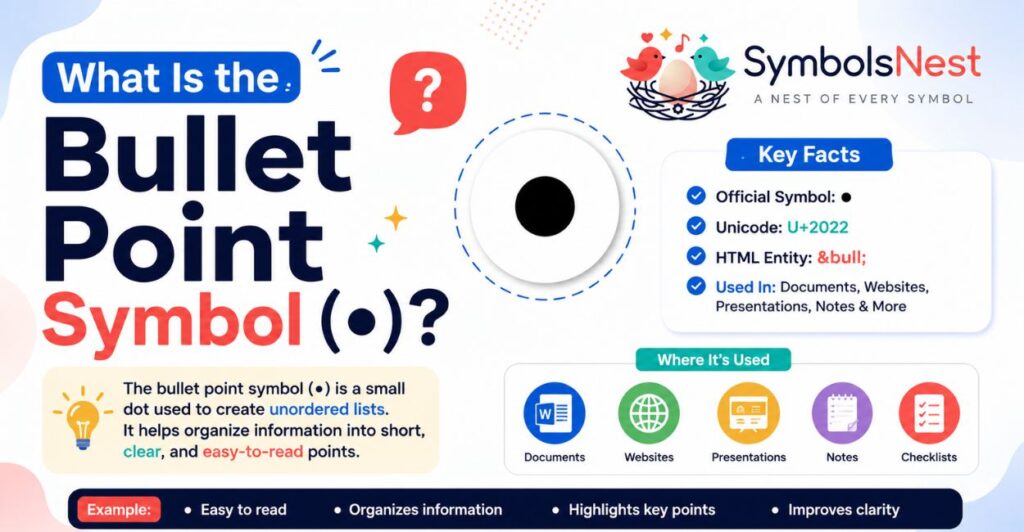
Quick Definition
The bullet point symbol (•) is a small round dot used to introduce items in an unordered list. Instead of numbering information, bullet points separate ideas into clear, organized sections that are easy to scan and understand.
Bullet Point Symbol: •
Bullet Point Meaning in English
In English, a bullet point is a typographical symbol placed before an item in a list. It highlights important information without showing any specific order or ranking.
For example:
- Apples
- Bananas
- Oranges
Each item is treated equally because no numbers are used.
Why Is It Called a Bullet Point?
The word “bullet” comes from the symbol’s small, round shape, which resembles a tiny bullet or dot. Over time, publishers and typographers adopted the symbol to separate information into clean, readable lists.
Today, the bullet point is used in:
- Articles and blogs
- School notes
- Business reports
- Microsoft Word documents
- Google Docs
- PowerPoint presentations
- Excel worksheets
- Websites
- Social media captions
- AI prompt formatting
Because bullet points make information easier to read, they have become one of the most widely used typography symbols in digital and printed content.
Bullet Point Meaning & Common Uses
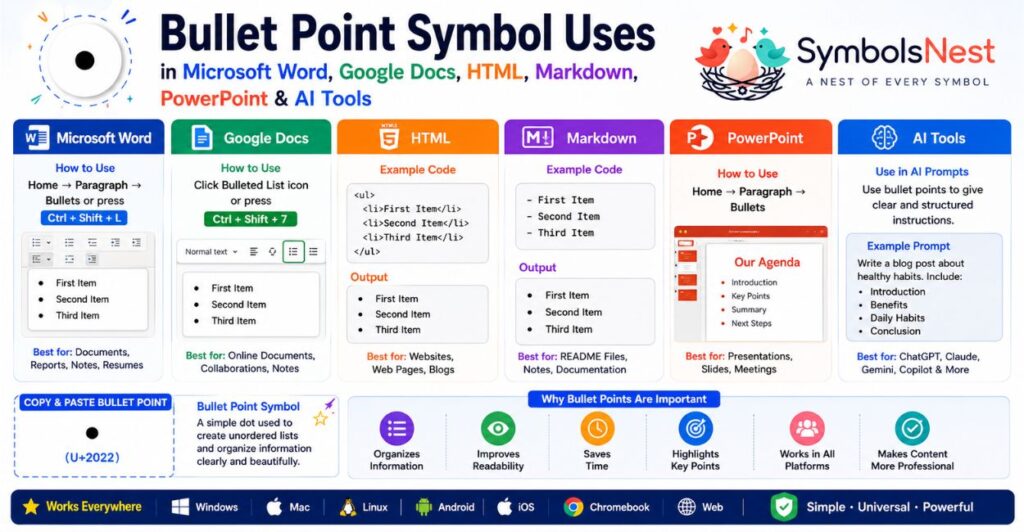
The bullet point symbol (•) is more than just a small dot. It helps organize information into clear, readable lists, making documents, websites, presentations, and digital content easier to understand. From school notes to professional reports, bullet points improve readability and help readers quickly find important information.
Writing & Lists
Bullet points are commonly used to break long paragraphs into short, organized points. They make articles, reports, emails, and notes easier to scan.
Example:
- Easy to read
- Highlights key ideas
- Organizes information
- Improves readability
Microsoft Word
Microsoft Word includes built-in bullet lists for creating professional documents. You can choose from different bullet styles or even customize your own symbol.
Common uses:
- Reports
- Assignments
- Resumes
- Meeting notes
- Checklists
Google Docs
Google Docs lets you create bullet lists with one click. It’s ideal for collaborative documents, project planning, and online note-taking.
People often use bullet points for:
- Study notes
- Shared documents
- Team projects
- Business plans
Microsoft PowerPoint
In PowerPoint, bullet points help presenters display key information without overcrowding slides.
They are perfect for:
- Presentation highlights
- Key takeaways
- Product features
- Business proposals
Microsoft Excel
Although Excel is mainly used for data, bullet points make worksheets cleaner by organizing notes inside cells.
They are useful for:
- Task lists
- Project updates
- Product features
- Inventory notes
HTML
Web developers use bullet points to create unordered lists on websites. The HTML <ul> and <li> tags automatically display bullet symbols.
They are commonly used for:
- Navigation menus
- Product features
- FAQs
- Blog articles
- Service lists
Markdown
Markdown creates bullet lists using a hyphen (-), plus (+), or asterisk (*). These automatically render as bullet points on many websites and documentation platforms. If you want a closer look at how that same asterisk character is used elsewhere, in footnotes, multiplication, and emphasis, see our Asterisk Symbol Meaning guide.
Example:
- First item
- Second item
- Third item
Typography
In typography, the bullet point is a special character that separates ideas without using numbers. It improves visual hierarchy and makes content easier to scan, much like the paragraph mark (¶) is used to signal breaks in a block of text. You can read more in our Paragraph Symbol Meaning guide.
Designers often use bullet points in:
- Brochures
- Books
- Flyers
- Infographics
- User manuals
Social Media
Bullet point symbols make captions, bios, and posts look cleaner and more engaging.
Example:
- Daily Motivation
- Travel Tips
- Healthy Recipes
- New Videos Every Week
Many creators also combine bullet points with decorative symbols and emojis for a unique style.
AI Prompt Formatting
Bullet points help AI tools understand instructions more clearly by separating each task into individual points.
Example:
- Write a blog introduction
- Use simple English
- Add SEO keywords naturally
- Keep paragraphs short
Well-structured bullet lists often produce more accurate and organized AI-generated responses.
📊 Common Uses of the Bullet Point Symbol
| Platform or Tool | How Bullet Points Are Used |
| Microsoft Word | Documents, resumes, reports |
| Google Docs | Notes, assignments, collaboration |
| PowerPoint | Presentation slides and highlights |
| Excel | Lists inside worksheet cells |
| HTML | Unordered lists on web pages |
| Markdown | Documentation and GitHub files |
| Social Media | Bios, captions, post formatting |
| AI Tools | Organized prompts and instructions |
| Typography | Books, brochures, magazines |
| Websites | Features, services, FAQs, navigation |
Key Takeaway: The bullet point symbol (•) is one of the most versatile text symbols. Whether you’re writing documents, designing presentations, coding websites, or creating AI prompts, it helps organize information into clear, easy-to-read lists.
Bullet Point Symbol Copy & Paste ⭐
Looking for the bullet point symbol copy and paste? Below you’ll find standard, decorative, and stylish bullet symbols that you can instantly copy for documents, resumes, websites, presentations, social media posts, and AI prompts.
Simply click or select your favorite symbol and paste it wherever you need.
Standard Bullet Point Symbol
The standard bullet point is the most widely used symbol for unordered lists in Microsoft Word, Google Docs, HTML, Markdown, and websites.
| Symbol | Name |
| • | Standard Bullet Point |
📦 Copy Box: •
Big Bullet Point Symbol Copy & Paste
Large bullet symbols are ideal for headings, presentations, posters, and eye-catching designs.
| Symbol | Name |
| ● | Black Circle |
| ⬤ | Large Black Circle |
| ⚫ | Black Circle Emoji |
📦 Copy Box: ● ⬤ ⚫
Circle Bullet Point Symbol
Circle bullets create a clean and minimal look for notes, documents, and presentations.
| Symbol | Name |
| ○ | White Circle |
| ◦ | White Bullet |
| ⚪ | White Circle Emoji |
📦 Copy Box: ○ ◦ ⚪
Open Bullet Point Symbol
Open bullet symbols are perfect when you want a lighter and more elegant list style.
| Symbol | Name |
| ◦ | White Bullet |
| ○ | White Circle |
| ◯ | Large Circle |
📦 Copy Box: ◦ ○ ◯
Bullet Point Star Symbols
Star bullets help important points stand out. They’re popular in resumes, announcements, presentations, and social media posts.
| Symbol | Name |
| ★ | Black Star |
| ☆ | White Star |
| ✦ | Black Four-Pointed Star |
| ✧ | White Four-Pointed Star |
| ✪ | Circled Star |
| ✯ | Pinwheel Star |
📦 Copy Box: ★ ☆ ✦ ✧ ✪ ✯
Black Bullet Point Symbols
These bold symbols are commonly used in professional documents, websites, and typography.
| Symbol | Name |
| • | Standard Bullet |
| ● | Black Circle |
| ▪ | Small Black Square |
| ■ | Black Square |
| ⚫ | Black Circle Emoji |
📦 Copy Box: • ● ▪ ■ ⚫
Decorative Bullet Point Symbols
Decorative bullets make lists more stylish for Instagram captions, blogs, invitations, planners, and creative designs. If you enjoy this kind of decorative styling, our Heart Symbols collection covers a similar range of stylish characters for captions and bios.
| Symbol | Style |
| ◆ | Diamond |
| ◇ | Hollow Diamond |
| ➤ | Arrow Bullet |
| ▶ | Triangle Bullet |
| ❖ | Decorative Diamond |
| ❥ | Heart Bullet |
| ✿ | Flower |
| ❀ | Blossom |
| ✓ | Check Mark |
| ✔ | Heavy Check Mark |
📦 Copy Box: ◆ ◇ ➤ ▶ ❖ ❥ ✿ ❀ ✓ ✔
🎨 Popular Bullet Point Symbol Collection
Need multiple bullet styles in one place? Copy any of these symbols below.
📦 All-in-One Copy Box: • ● ⬤ ⚫ ○ ◦ ◯ ⚪ ★ ☆ ✦ ✧ ✪ ✯ ▪ ■ ◆ ◇ ➤ ▶ ❖ ✓ ✔ ✿ ❀ ❥
Which Bullet Point Symbol Should You Use?
| Use Case | Recommended Symbol |
| Everyday Lists | • |
| Professional Documents | ● |
| Presentations | ● ⬤ |
| Minimal Design | ○ ◦ |
| Social Media | ✦ ✧ ❥ ✿ |
| Resume | • ✓ |
| Website Features | ➤ ✓ |
| Creative Projects | ◆ ❖ ✿ |
Pro Tip: Use the standard • bullet for professional documents, while decorative symbols like ✦, ◆, ➤, and ❥ work best for blogs, social media, invitations, and creative designs.
How to Type Bullet Point Symbol on Keyboard ⭐
Typing the bullet point symbol (•) is quick and easy on almost every device. Whether you’re using Windows, Mac, Linux, Chromebook, Android, iPhone, Microsoft Word, or Google Docs, there are built-in keyboard shortcuts that let you insert bullet points in seconds.
Bullet Point Symbol on Windows
Windows offers several ways to type a bullet point.
Method 1: Alt Code (Most Popular)
- Turn on Num Lock.
- Hold the Alt key.
- Type 0149 on the numeric keypad.
- Release Alt.
Result: •
Method 2: Microsoft Word Shortcut Type an asterisk (*) followed by a space. Word automatically creates a bullet list.
Example: * [Space] becomes: • First Item
Bullet Point Symbol on Mac
On macOS, use this keyboard shortcut: Option (⌥) + 8
Result: •
This shortcut works in Pages, Microsoft Word, Notes, and most Mac applications.
Bullet Point Symbol on Linux
Most Linux distributions support Unicode input.
- Press Ctrl + Shift + U
- Type: 2022
- Press Enter.
Result: •
Bullet Point Symbol on Chromebook
Chromebooks don’t have a dedicated bullet key, but you can still insert bullets.
- Method 1: Right-click → Emoji & Symbols (if available)
- Method 2: Copy and paste: •
- Method 3: Use the bullet list button in Google Docs.
Bullet Point Symbol on Android
On Android phones:
- Open the keyboard.
- Tap ?123 or Symbols.
- Look for the • symbol.
If it’s not available, simply copy and paste: •
Bullet Point Symbol on iPhone & iPad
On iPhone or iPad:
- Open the keyboard.
- Tap 123, then #+=.
- Some keyboards include the bullet symbol.
If not, copy and paste: •. You can also create a Text Replacement shortcut in iOS for faster typing.
Bullet Point in Microsoft Word
Using the Ribbon: Home → Paragraph → Bullets
Keyboard Method: Press Ctrl + Shift + L. This instantly creates a bulleted list.
Bullet Point in Google Docs
Toolbar Method: Click the Bulleted List icon.
Keyboard Shortcut:
- Windows: Ctrl + Shift + 7
- Mac: ⌘ + Shift + 7
Bullet Point Alt Code
The most common Windows Alt Code is:
| Symbol | Alt Code |
| • | Alt + 0149 |
Remember to use the numeric keypad for this shortcut.
Keyboard Shortcut Summary
| Device or App | Keyboard Shortcut |
| Windows | Alt + 0149 |
| Mac | Option + 8 |
| Linux | Ctrl + Shift + U, then 2022 |
| Chromebook | Copy & Paste or Google Docs Toolbar |
| Android | Symbols Keyboard or Copy & Paste |
| iPhone | Symbols Keyboard or Copy & Paste |
| Microsoft Word | Ctrl + Shift + L |
| Google Docs (Windows) | Ctrl + Shift + 7 |
| Google Docs (Mac) | ⌘ + Shift + 7 |
📊 Bullet Point Keyboard Shortcut Table
| Platform | Method | Result |
| Windows | Alt + 0149 | • |
| Mac | Option + 8 | • |
| Linux | Ctrl + Shift + U → 2022 | • |
| Chromebook | Copy & Paste / Toolbar | • |
| Android | Symbols Keyboard | • |
| iPhone | Symbols Keyboard | • |
| Microsoft Word | Ctrl + Shift + L | Starts Bullet List |
| Google Docs | Ctrl + Shift + 7 | Starts Bullet List |
Quick Tip: If you can’t remember the keyboard shortcut, the fastest method is to copy and paste the bullet symbol below.
📦 Copy Box: •
Unicode, HTML & Character Codes
The bullet point symbol (•) is represented by standardized character codes, making it compatible with nearly every operating system, programming language, and web browser. Whether you’re creating a website, writing HTML, or working with Unicode text, these codes ensure the bullet symbol displays correctly across different platforms.
Bullet Point Symbol Character Codes
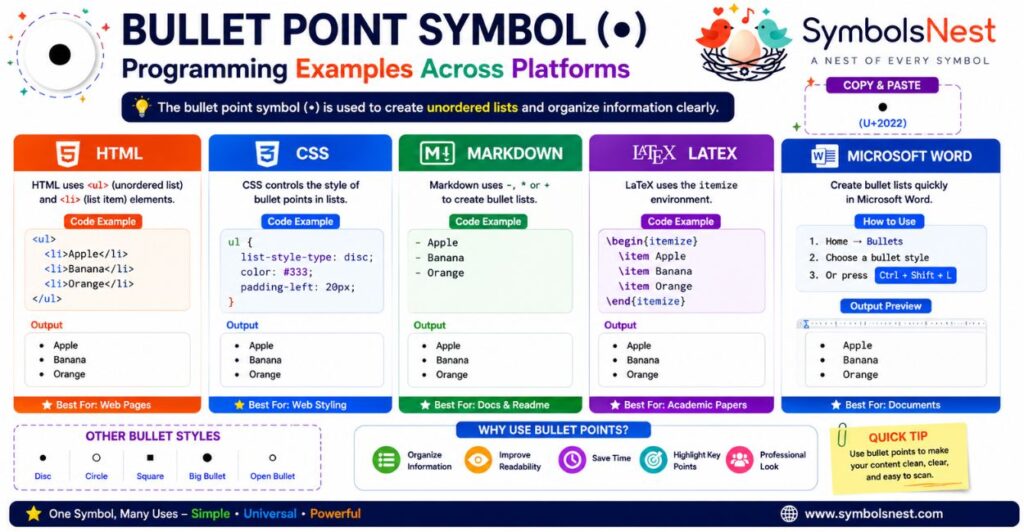
| Property | Value |
| Symbol | • |
| Unicode | U+2022 |
| Unicode Name | Bullet |
| HTML Entity | • |
| HTML Number | • |
| Decimal Code | 8226 |
| Hex Code | 2022 |
| Windows Alt Code | Alt + 0149 |
| UTF-8 | E2 80 A2 |
| UTF-16 | 2022 |
What Is the Unicode for the Bullet Point Symbol?
The official Unicode value for the bullet point is:
📦 Copy Box: U+2022
Unicode gives every character a unique code, allowing the • symbol to display consistently across websites, apps, documents, and operating systems.
Bullet Point HTML Code
When building a website, you can insert a bullet point using the HTML entity.
Named HTML Entity: • → Output: •
Numeric HTML Entity: • → Output: •
Both methods produce the same bullet point symbol in modern web browsers.
Bullet Point UTF-8 Encoding
UTF-8 is the most common character encoding used on the web.
| Encoding | Value |
| UTF-8 | E2 80 A2 |
This encoding ensures the bullet point displays correctly in HTML pages, databases, emails, and APIs.
Windows Alt Code
On Windows computers, you can quickly type the bullet point using the numeric keypad.
📦 Shortcut: Alt + 0149 → Result: •
HTML Example
Here’s a simple HTML example that creates a bulleted list.
<!DOCTYPE html>
<html>
<body>
<ul>
<li>Apple</li>
<li>Banana</li>
<li>Orange</li>
</ul>
</body>
</html>
Output: Apple, Banana, Orange
Using the Bullet Symbol Inside HTML Text
You can also insert the symbol directly into a paragraph.
<p>• Easy to Read</p>
<p>• Clean Formatting</p>
<p>• Better Organization</p>
Output: • Easy to Read • Clean Formatting • Better Organization
Quick Reference Table
| Code Type | Value |
| Symbol | • |
| Unicode | U+2022 |
| HTML Entity | • |
| HTML Number | • |
| Alt Code | Alt + 0149 |
| UTF-8 | E2 80 A2 |
| Hex | 2022 |
Quick Tip: For websites, use • or •. For Windows, use Alt + 0149. If you’re working with programming languages or databases, Unicode U+2022 is the universal standard.
Programming Examples
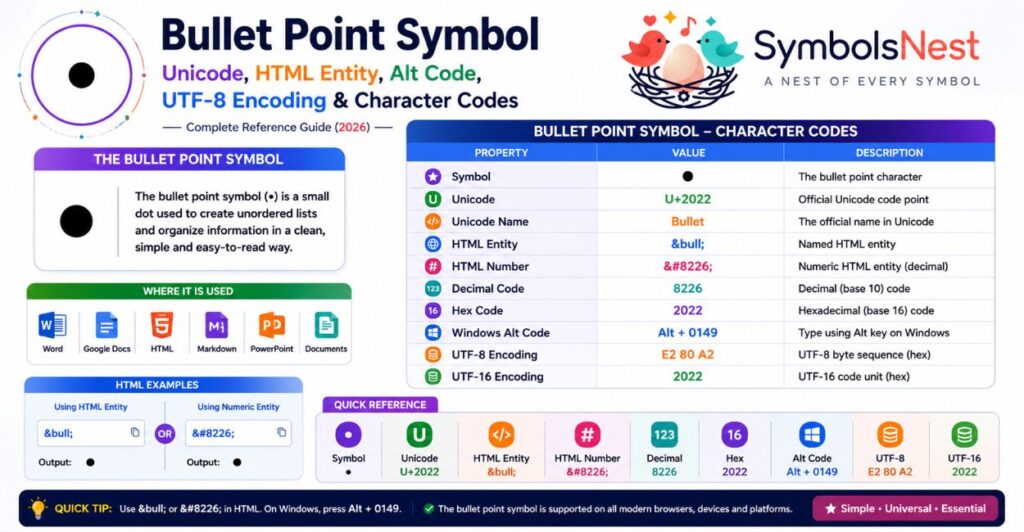
The bullet point symbol (•) is supported by most programming languages and markup formats. Whether you’re building a website, writing documentation, or formatting text, you can easily create bullet lists using the methods below.
Bullet Point in HTML
HTML uses the <ul> (unordered list) and <li> (list item) tags to create bullet lists automatically.
<ul>
<li>Apple</li>
<li>Banana</li>
<li>Orange</li>
</ul>
Output: Apple, Banana, Orange
You can also insert a bullet manually using the HTML entity: • or •
Bullet Point in CSS
CSS controls how bullet points appear on a webpage. You can change their style using the list-style-type property.
ul {
list-style-type: disc;
}
Other Common Bullet Styles
| CSS Value | Appearance |
| disc | • Standard Bullet |
| circle | ○ Hollow Circle |
| square | ■ Square Bullet |
| none | No Bullet |
Bullet Point in Markdown
Markdown automatically creates bullet lists using a hyphen (-), asterisk (*), or plus sign (+).
– Apple
– Banana
– Orange
or
* Apple
* Banana
* Orange
Output: Apple, Banana, Orange
Markdown bullets are widely used on GitHub, Reddit, documentation websites, and note-taking apps. When you’re chaining commands in a terminal to build or test these files, you’ll often run into the pipe symbol (|) as well, see our Pipe Symbol Meaning guide for how that character works.
Bullet Point in LaTeX
LaTeX uses the itemize environment to generate bullet lists in academic papers, reports, and research documents.
\begin{itemize}
\item Apple
\item Banana
\item Orange
\end{itemize}
Output: Apple, Banana, Orange
Bullet Point in Microsoft Word
Microsoft Word can create bullet lists without manually typing the bullet symbol.
Method 1: Toolbar — Go to Home → Bullets. Select your preferred bullet style.
Method 2: Keyboard Shortcut — Press Ctrl + Shift + L. Word instantly starts a bulleted list.
Programming Reference Table
| Platform | Syntax or Method |
| HTML | <ul><li>Item</li></ul> |
| HTML Entity | • |
| HTML Number | • |
| CSS | list-style-type: disc; |
| Markdown | – Item or * Item |
| LaTeX | \begin{itemize}…\end{itemize} |
| Microsoft Word | Ctrl + Shift + L |
Which Method Should You Use?
| If You Are Working In… | Best Method |
| Website Development | HTML <ul> and <li> |
| Web Styling | CSS list-style-type |
| GitHub or Documentation | Markdown |
| Academic Papers | LaTeX |
| Office Documents | Microsoft Word Bullets |
| Simple Text | Copy & Paste • |
Pro Tip: Use built-in list features instead of manually typing • whenever possible. This improves formatting, accessibility, and consistency across documents, websites, and applications.
Bullet Point vs Similar Symbols ⭐
Although many symbols look similar to the bullet point (•), each one has a different purpose and visual style. Understanding these differences helps you choose the right symbol for documents, websites, presentations, resumes, and creative designs.
| Symbol | Name | Common Use |
| • | Bullet Point | Standard unordered lists |
| ● | Black Circle | Large bullets and emphasis |
| ○ | White Circle | Minimal and elegant lists |
| ◦ | White Bullet | Secondary or nested lists |
| ★ | Black Star | Highlights and featured items |
| ✓ | Check Mark | Completed tasks and verification |
| ◆ | Black Diamond | Decorative lists and menus |
| ▪ | Small Black Square | Compact bullet lists |
• Bullet Point
The standard bullet point (•) is the most widely used list marker. It is perfect for documents, articles, presentations, notes, and websites.
Best for: Blog posts, Reports, School assignments, Microsoft Word, Google Docs
● Black Circle
The black circle (●) is larger and bolder than the standard bullet. It grabs attention and works well for headings or important list items.
Best for: Presentations, Posters, Infographics, Design layouts
○ White Circle
The white circle (○) creates a clean and modern appearance. It’s often used in minimal designs and elegant documents.
Best for: Professional reports, Business documents, Clean presentations
◦ White Bullet
The white bullet (◦) is commonly used as a secondary bullet in nested lists.
Example:
Main Topic
◦ Subtopic 1
◦ Subtopic 2
It helps organize information without making the list look crowded.
★ Star Symbol
The star symbol (★) is designed to highlight important information rather than create ordinary lists.
Best for: Featured products, Important notes, Ratings, Awards, Social media posts
✓ Check Mark
The check mark (✓) indicates completion, approval, or success.
Example: ✓ Task Completed, ✓ Verified Information, ✓ Checklist Item
Unlike bullet points, check marks suggest that an action has already been completed.
◆ Diamond Symbol
The diamond symbol (◆) is decorative and often used in creative documents or navigation menus.
Best for: Invitations, Brochures, Creative designs, Luxury branding
▪ Square Bullet
The small square (▪) is a compact alternative to the standard bullet point.
It works well in: Tables, Dashboards, Technical documentation, Compact lists
Comparison Table
| Feature | • Bullet | ● Circle | ○ White Circle | ★ Star | ✓ Check | ◆ Diamond |
| Standard Lists | ✅ | ✅ | ✅ | ❌ | ❌ | ❌ |
| Professional Documents | ⭐⭐⭐⭐⭐ | ⭐⭐⭐⭐ | ⭐⭐⭐⭐ | ⭐⭐ | ⭐⭐⭐ | ⭐⭐ |
| Presentations | ⭐⭐⭐⭐ | ⭐⭐⭐⭐⭐ | ⭐⭐⭐ | ⭐⭐⭐⭐ | ⭐⭐⭐ | ⭐⭐⭐ |
| Decorative Design | ⭐⭐ | ⭐⭐⭐ | ⭐⭐⭐ | ⭐⭐⭐⭐⭐ | ⭐⭐⭐ | ⭐⭐⭐⭐⭐ |
| Task Lists | ⭐⭐⭐ | ⭐⭐ | ⭐⭐ | ⭐ | ⭐⭐⭐⭐⭐ | ⭐ |
Which Symbol Should You Choose?
| Purpose | Best Symbol |
| Everyday Lists | • |
| Large Bullet Lists | ● |
| Minimal Design | ○ |
| Nested Lists | ◦ |
| Important Highlights | ★ |
| Checklists | ✓ |
| Decorative Content | ◆ |
| Compact Lists | ▪ |
Quick Tip: Use the standard • bullet point for most documents and websites. Choose ★ for highlighting important content, ✓ for completed tasks, ◆ for decorative designs, and ○ or ◦ when you want a cleaner, more modern list style.
Frequently Asked Questions (FAQs)
1. What is the Bullet Point Symbol?
The bullet point symbol (•) is a small round dot used to create unordered lists. It helps organize information into short, easy-to-read points without using numbers.
2. What Does Bullet Point Mean in English?
In English, a bullet point is a typographic symbol placed before an item in a list. It highlights separate ideas, tasks, or pieces of information while showing that the items are not arranged in a specific order.
3. How Do I Type a Bullet Point on a Keyboard?
The method depends on your device: Windows (Alt + 0149), Mac (Option + 8), Linux (Ctrl + Shift + U, then type 2022), Microsoft Word (Ctrl + Shift + L), Google Docs (Bulleted List button or keyboard shortcut).
4. What Is the Bullet Point Alt Code?
The Windows Alt Code for the standard bullet point is Alt + 0149. Hold the Alt key, type 0149 on the numeric keypad, then release Alt.
5. What Is the Unicode for the Bullet Point Symbol?
The official Unicode value for the bullet point symbol is U+2022. Unicode ensures the symbol displays consistently across different devices, operating systems, and applications.
6. How Do I Copy and Paste a Bullet Point?
Simply copy the symbol (•) and paste it anywhere you need. It works in Microsoft Word, Google Docs, PowerPoint, Excel, websites, emails, social media, and messaging apps.
7. What Is the HTML Code for a Bullet Point?
You can insert a bullet point in HTML using either • or •. Both display the standard bullet point symbol: •
8. What Is the Difference Between a Bullet Point and a Check Mark?
A bullet point (•) is used to organize information into lists, while a check mark (✓) indicates that a task has been completed, approved, or verified.
Example: • Meeting Agenda / ✓ Meeting Completed
9. Which Bullet Point Symbol Is Best for Resumes?
The standard bullet point (•) is the best choice for resumes because it looks professional, clean, and easy to read. It also works well with applicant tracking systems (ATS).
10. Can I Use Bullet Point Symbols on Mobile Devices?
Yes. You can use bullet point symbols on both Android and iPhone by accessing the symbols keyboard or simply copying and pasting the bullet symbol (•). The symbol works in messaging apps, notes, documents, emails, and social media platforms.
Related Questions
Users also search for:
- What is the bullet point symbol called?
- How do I insert a bullet point in Word?
- What is the Unicode value of the bullet symbol?
- How do I make bullet lists in Google Docs?
- Which bullet symbol is best for presentations?
- Can I use decorative bullet symbols on social media?
Related Symbols
If you’re interested in the bullet point symbol (•), you may also want to explore other commonly used text symbols on our site. These guides explain each symbol’s meaning, Unicode, Alt Code, keyboard shortcuts, copy-and-paste options, and real-world uses.
| Symbol | Related Guide | Why Read It? |
| * | Asterisk Symbol Meaning | Learn how the asterisk is used in Markdown bullet lists, footnotes, and multiplication. |
| ¶ | Paragraph Symbol Meaning | Discover how the paragraph mark structures text in typography and editing. |
| | | Pipe Symbol Meaning | Understand the pipe character’s role in programming, Linux commands, and logical operations. |
| ♥ | Heart Symbols | Browse the full collection of heart symbol meanings and colors. |
Want the full library of text symbols? Visit our Symbols Meaning Guide for a complete index.
Expand Your Symbol Collection
Reading these related guides will help you better understand Unicode characters, keyboard shortcuts, HTML entities, and special symbols used in everyday writing, web development, design, and digital communication.
Final Thoughts
The bullet point symbol (•) is a simple yet powerful character that makes information easier to organize and read. Whether you’re writing documents, creating presentations, designing websites, formatting Markdown, or building AI prompts, bullet points improve clarity and help readers quickly scan important details.
In this guide, you’ve learned the bullet point symbol meaning, explored copy-and-paste bullet styles, discovered Unicode, HTML entities, Alt Codes, and keyboard shortcuts, and compared the bullet point with similar symbols. You also saw practical examples for Microsoft Word, Google Docs, HTML, CSS, Markdown, and LaTeX, making this a complete reference for beginners and professionals alike.
Keep this page bookmarked whenever you need to copy a bullet point symbol, find the correct keyboard shortcut, or choose the best bullet style for your documents, websites, resumes, presentations, or social media posts.

hi iam Emma SymbolsNest.com is a simple website where you can find thousands of symbols and special characters. It helps you copy and paste Unicode symbols for social media, messages, documents, and creative projects.
