
Plain text can look flat on social media. Our free Bold Text Generator turns regular words into stylish Unicode bold fonts, so your bio, caption or headline stands out. Type once and every style appears instantly.
It works for Instagram, Facebook, TikTok, LinkedIn, WhatsApp and Discord. Preview each style live, copy it with one click and paste it anywhere that accepts text. There is no app, sign up or install.
Enter your text below to instantly transform it into stylish bold fonts. This online bold text maker works as a bold letters generator for Instagram, WhatsApp, TikTok, Discord and more.
Characters: 0 · Without spaces: 0 · Words: 0 · Lines: 0
Bold Text for Social Media
Download Bold Text Design Templates
Choose a template, pick a size and bold style, then download your text as a ready-to-post image (PNG or JPG). It uses the text from the box above.
Recent styles
⚡ Quick Answer
- What it does: converts normal text into bold Unicode characters you can copy and paste.
- Best for: Instagram bios, Facebook posts, LinkedIn headlines, TikTok, WhatsApp, Discord and X.
- How to use it: type your text, pick a style, click copy and paste.
- Cost: free, with no registration.
- Good to know: the result is special Unicode characters, not a real font weight, so the look can vary slightly by device.
(Place the Bold Text Generator tool here, right after the Quick Answer box.)
What Is a Bold Text Generator?
A bold text generator is an online tool that converts regular letters into bold Unicode characters. You type normal text, the tool swaps each letter for a bold look alike symbol, and you copy the result into bios, posts, comments and messages.
Here is a quick example:
| Type | Example |
| Normal text | Hello Beautiful World |
| Bold text | 𝗛𝗲𝗹𝗹𝗼 𝗕𝗲𝗮𝘂𝘁𝗶𝗳𝘂𝗹 𝗪𝗼𝗿𝗹𝗱 |
Regular bold formatting, like pressing Ctrl+B in a document, changes how a font is drawn. Unicode bold replaces the characters themselves. That is why it still works in places with no formatting menu, such as an Instagram bio or a username field.
People use bold fonts to highlight a name, a key offer or a short call to action in a feed full of plain text.
How to Use Our Free Bold Text Generator

Using the tool takes less than ten seconds. Follow these steps.
Step 1: Enter or Paste Your Text
Type directly into the input box or paste text you already wrote.
Step 2: Choose Your Favorite Bold Font Style
Scroll through the available styles. Each one shows your text right away.
Step 3: Preview Different Bold Text Variations
Compare a few styles side by side. Bold sans serif is easy to read, while script and fraktur are more decorative.
Step 4: Click the Copy Button
Click copy next to the style you like. You can also use Copy All to grab every style at once.
Step 5: Paste Your Bold Text Anywhere
Paste it into Instagram, WhatsApp, Discord or any text field.
Example: Type Open Monday 9 to 5, choose bold sans serif, copy, and paste 𝗢𝗽𝗲𝗻 𝗠𝗼𝗻𝗱𝗮𝘆 𝟵 𝘁𝗼 𝟱 into your bio. Numbers are converted too.
30+ Bold Text Fonts to Copy and Paste
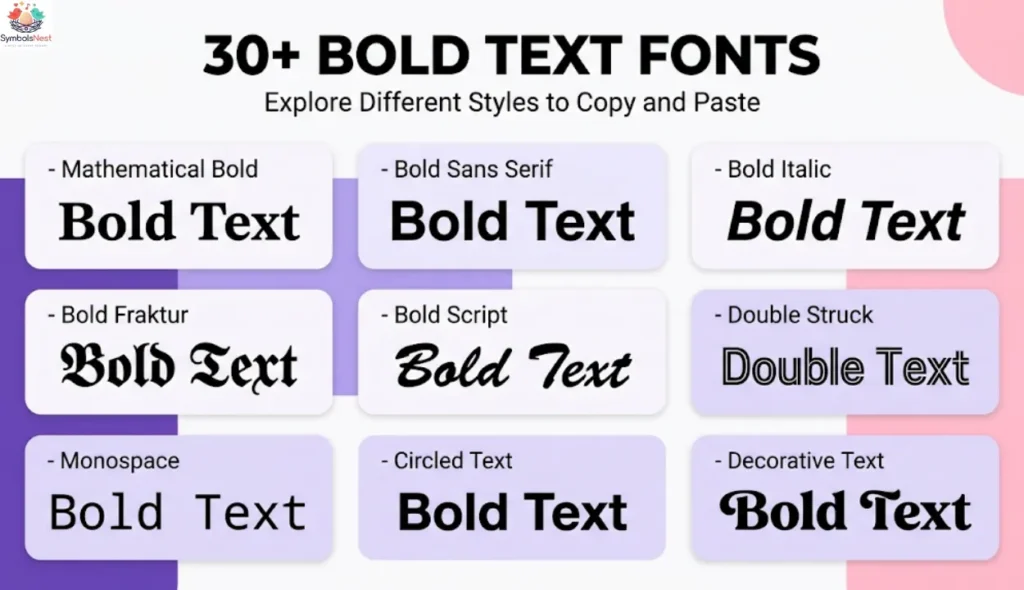
The generator offers more than 30 styles, grouped here so you can find the right look fast. Every example below was made from the same phrase, “Bold Text Generator”. If you want to browse even more looks, try our Fancy Text Generator or the Pretty Font Generator.
Classic Bold Fonts
These are the cleanest styles and the most reliable across devices.
- Mathematical Bold: 𝐁𝐨𝐥𝐝 𝐓𝐞𝐱𝐭 𝐆𝐞𝐧𝐞𝐫𝐚𝐭𝐨𝐫
- Bold Sans Serif: 𝗕𝗼𝗹𝗱 𝗧𝗲𝘅𝘁 𝗚𝗲𝗻𝗲𝗿𝗮𝘁𝗼𝗿
- Bold Serif: 𝐁𝐨𝐥𝐝 𝐓𝐞𝐱𝐭 𝐆𝐞𝐧𝐞𝐫𝐚𝐭𝐨𝐫
- Bold Italic: 𝑩𝒐𝒍𝒅 𝑻𝒆𝒙𝒕 𝑮𝒆𝒏𝒆𝒓𝒂𝒕𝒐𝒓
- Bold Sans Serif Italic: 𝘽𝙤𝙡𝙙 𝙏𝙚𝙭𝙩 𝙂𝙚𝙣𝙚𝙧𝙖𝙩𝙤𝙧
Decorative Bold Fonts
Use these for names, short headings and creative bios.
- Bold Fraktur: 𝕭𝖔𝖑𝖉 𝕿𝖊𝖝𝖙 𝕲𝖊𝖓𝖊𝖗𝖆𝖙𝖔𝖗
- Bold Script: 𝓑𝓸𝓵𝓭 𝓣𝓮𝔁𝓽 𝓖𝓮𝓷𝓮𝓻𝓪𝓽𝓸𝓻
- Double Struck: 𝔹𝕠𝕝𝕕 𝕋𝕖𝕩𝕥
- Monospace: 𝙱𝚘𝚕𝚍 𝚃𝚎𝚡𝚝 𝙶𝚎𝚗𝚎𝚛𝚊𝚝𝚘𝚛
- Circled and Squared Text: boxed letter styles for a badge look
Stylish and Aesthetic Bold Fonts
These pair bold text with symbols for extra personality.
- Stars: ★ 𝗕𝗼𝗹𝗱 𝗧𝗲𝘅𝘁 ★
- Hearts: ♥ 𝗕𝗼𝗹𝗱 𝗧𝗲𝘅𝘁 ♥
- Brackets: 【𝗕𝗼𝗹𝗱 𝗧𝗲𝘅𝘁】
- Sparkles: ✨ 𝗕𝗼𝗹𝗱 𝗧𝗲𝘅𝘁 ✨
- Decorative symbols: mix bold text with lines, arrows and dots
Each style has its own copy button, so you only copy what you need. For more decorative symbols, see our aesthetic symbols collection.
Bold Text Generator for Instagram
Instagram does not offer bold formatting in bios, captions or names. That is why many people search for a bold text generator Instagram users can trust. Unicode bold fills that gap, because the characters are plain text that Instagram accepts.
Bold Instagram Bio Fonts
Bold sans serif works best in a bio. It stays readable at small sizes. Use it for your job title or niche, and keep the rest in normal text.
Bold Instagram Captions
Bold the first line of a caption as a hook. Avoid bolding a whole caption, because it becomes hard to read.
Bold Instagram Profile Names
Your display name can carry bold characters. Remember that your username still allows only standard letters, numbers, periods and underscores.
Bold Instagram Comments and Stories
Use bold for one or two words in a comment or story text. A little emphasis goes a long way.
Example:
- Normal: Hello Beautiful World
- Bold: 𝗛𝗲𝗹𝗹𝗼 𝗕𝗲𝗮𝘂𝘁𝗶𝗳𝘂𝗹 𝗪𝗼𝗿𝗹𝗱
Need ready made bio ideas? Browse our Instagram fonts page or the aesthetic bio maker for Instagram.
Bold Text Generator Copy and Paste

The tool is built for fast bold text generator copy and paste. Everything happens in your browser, and the text goes straight to your clipboard.
How to Copy Bold Text
Click the copy button beside any style. Use Copy All to copy every style at once, then keep the one you want.
How to Paste Bold Fonts on Any Device
On a phone, long press the text field and tap Paste. On Windows, press Ctrl+V. On Mac, press Command+V.
Why Some Bold Characters Look Different on Different Devices
Each phone or computer draws Unicode characters with its own installed fonts. Most modern devices handle bold Unicode well, but older systems may show small spacing changes or empty boxes. Test your text before you publish.
Bold Text Generator for Facebook
Many people look for a Facebook font changer because Facebook posts do not always offer a bold option. Unicode bold gives you emphasis in a plain text box. Formatting options differ between personal profiles, pages and groups, so always check how your post looks after you paste.
Bold Facebook Posts
Bold the headline or the main offer. Keep the body text normal.
Bold Facebook Bio and About Section
A bold intro line makes your About section easier to scan.
Bold Facebook Comments
Use bold sparingly in comments. One bold word is enough to draw attention.
How to Copy and Paste Bold Facebook Text
Generate your text, copy it, and paste it into the Facebook box. For more style options, try our Font Changer.
Bold Text Generator for LinkedIn
LinkedIn’s standard editor does not provide native bold in every text field, such as headlines and some post boxes. Unicode bold helps professionals emphasize selected words without extra tools. If you want a bold text generator LinkedIn readers will find professional, choose a clean style like bold sans serif.
Bold LinkedIn Headlines
Bold one key phrase, such as your role or specialty. Do not bold the full headline.
Bold LinkedIn Profile Descriptions
Use bold labels for short sections like “Services” or “Experience” in your About text.
Bold Text for LinkedIn Posts
Bold the opening line so it catches attention before the “see more” cut off.
How to Highlight Important Words on LinkedIn
Pick two or three words per post. Too much bold looks cluttered and can reduce readability for screen reader users.
Bold Text for TikTok, WhatsApp, Discord and X (Twitter)
Unicode bold works as plain text on most social platforms. Rendering is not guaranteed to be identical everywhere, so preview before you post.
Bold TikTok Bio and Profile Text
TikTok bios are short, so bold a single word or phrase. Bold sans serif is a safe choice.
Bold WhatsApp Status and Messages
WhatsApp has its own bold shortcut using asterisks around a word. Unicode bold is useful when you want a different style, such as script or fraktur.
Bold Discord Username and Server Messages
Discord supports bold with double asterisks in messages. People searching for a font for Discord usually want styled names and server titles, which Unicode characters can provide. See our Discord bio ideas for inspiration.
Bold X (Twitter) Bio and Posts
If you want a Twitter font for your bio or a post, copy a style from the generator and paste it in. Stylish copy and paste fonts are plain text, so they travel easily.
Blue Bold Text Generator – Can You Make Text Blue?
Many users ask for a bold text generator with blue colour. Here is the honest answer.
How to Create Blue Bold Text
Unicode bold characters carry no color. Blue can appear only through styling in a supported page, such as a preview on a website that uses CSS.
Blue Text Styles for Social Media
Social apps control their own text color. Instagram, WhatsApp and most other platforms show your pasted text in their default color.
Can You Copy and Paste Colored Text?
Copying Unicode text keeps the characters, not the color. Do not expect blue to survive after pasting. If color matters, add a blue emoji like 🔵 or 💙 next to your bold text instead.
Bold Text Generator for Urdu and Arabic
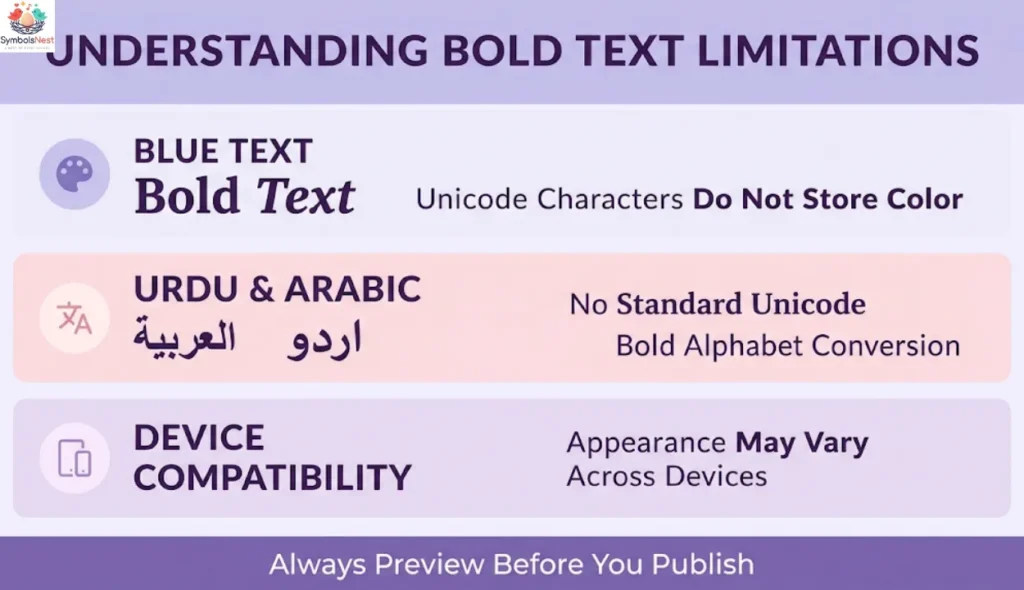
Many readers want an Urdu bold text generator or an Arabic bold text generator. The technical limits matter here.
Urdu Bold Text Generator
Unicode includes bold versions of English letters and numbers, but it has no matching bold alphabet for Urdu script. Our bold conversion therefore works for English letters and numbers.
Arabic Bold Text Generator
Arabic script is cursive, and letters change shape depending on their position in a word. Swapping characters would break that joining, which is why no standard bold Arabic Unicode set exists.
How to Make Urdu and Arabic Text Bold
Use the bold button in an editor, such as Word, Google Docs or your website editor. That applies a heavier font weight, known as CSS or editor bold.
Urdu and Arabic Text Compatibility on Social Media
Bold formatting for these scripts may work inside supported editors, but plain text copy and paste bold conversion is not universally available. Test it on your platform first.
Bold vs Italic Text Generator – What’s the Difference?
Bold and italic are close cousins, and people often search for an italic text generator right after bold.
What Is a Bold Text Font?
A bold text font uses heavier strokes to make letters stand out. In Unicode, that means a separate bold character set.
What Is an Italic Text Generator?
An italic text generator slants letters to the right. Many people search for italicize text or an italic font generator to add a softer kind of emphasis.
Bold Italic Text Examples
- Bold: 𝗦𝘁𝘆𝗹𝗲 𝗡𝗼𝘄
- Bold Italic: 𝙎𝙩𝙮𝙡𝙚 𝙉𝙤𝙬
When Should You Use Bold or Italic Fonts?
Use bold for headings, names and key offers. Use italic for quotes, titles and light emphasis. Our Cursive Text Generator is another good option when you want a handwritten feel.
More Text Styles You Can Create Online
Bold is only one way to style text. Here are other popular formats people look for.
Strikethrough Text Generator
Strikethrough, also called cross out text, draws a line through words. It is great for humor and corrections.
Number Font Generator
A number font generator styles digits for dates, prices and countdowns. Try our Number Font Generator for that.
Fancy Text and Special Fonts
Fancy text covers script, gothic and bubble looks. Browse the Fancy Text Generator or the Serif Fonts Generator.
Decorative Text and Symbol Styles
Symbols can frame your text. Our copy and paste symbols library has thousands of options.
Best Features of Our Bold Text Generator
The generator is built to be quick and simple.
30+ Bold Unicode Font Styles
Choose from classic, decorative and aesthetic bold styles in one place.
Live Text Preview
See every style update as you type.
One Click Copy and Copy All
Copy a single style or every style at once.
Social Media Font Presets
Pick a style suited to Instagram, Facebook, LinkedIn and more.
Bold Text Decorations
Add stars, hearts, brackets and sparkles around your text.
Favorite Styles and Recent History
Save styles you like and reuse recent text.
Character and Word Counter
Check length before you paste into limited fields like bios.
Mobile Friendly Design
The layout works on phones, tablets and desktops.
Free and No Registration Required
Open the page and start. No account is needed.
Unicode Bold Text vs Regular Bold Formatting
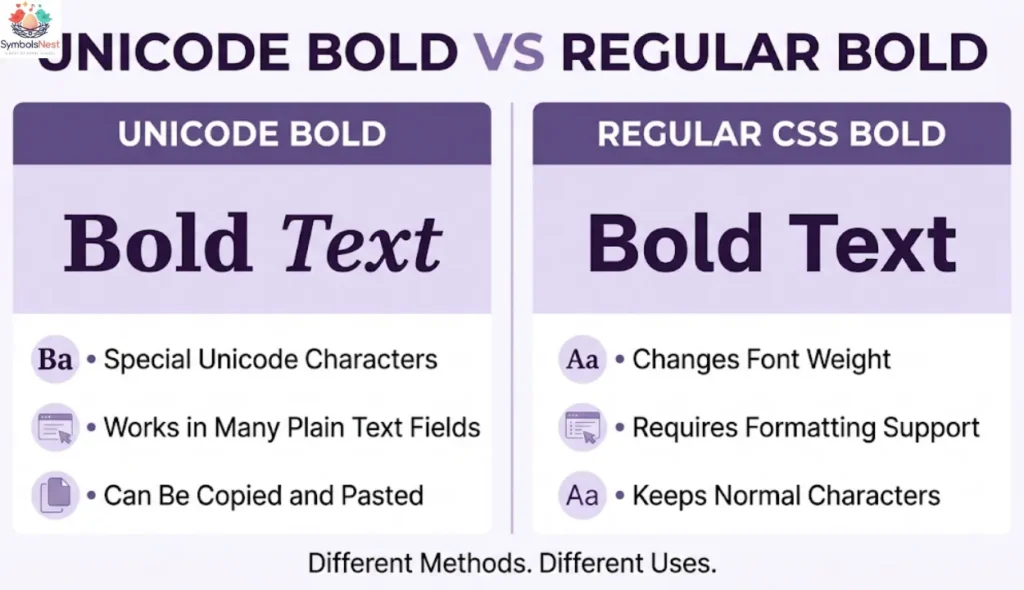
Understanding the difference helps you use bold text wisely.
How Unicode Bold Characters Work
Mathematical Alphanumeric Symbols are separate Unicode characters, not normal letters made heavier. The [Unicode Consortium](<a href=”https://www.unicode.org/” target=”_blank” rel=”nofollow noopener noreferrer”>Unicode Consortium</a>) maintains the standard, and the block is documented in its <a href=”https://www.unicode.org/charts/PDF/U1D400.pdf” target=”_blank” rel=”nofollow noopener noreferrer”>Mathematical Alphanumeric Symbols chart</a>.
CSS Font Weight vs Unicode Bold Text
| Feature | Unicode Bold | Regular (CSS) Bold |
| How it works | Replaces characters | Changes font weight |
| Works in plain text fields | Yes, in most cases | No |
| Needs an editor | No | Yes |
| Keeps normal letters | No | Yes |
| Screen reader friendly | Limited | Yes |
Why Unicode Bold Text Can Look Different
Different devices use different fonts. If a font lacks a character, the device shows a fallback or an empty box.
Unicode Accessibility and Screen Reader Limitations
Screen readers may read each bold character by its technical name or skip it. Search engines may also not treat these characters as normal letters. Use Unicode bold for short emphasis only, and keep important keywords in regular text.
Where Can You Use Bold Unicode Text?
Bold Unicode works wherever a text field accepts standard Unicode characters.
| Platform | Common use | Compatibility note |
| Bio, captions, names | Display name accepts it; username does not | |
| Posts, About section | Check each field after pasting | |
| Headline, posts | Best for short emphasis | |
| TikTok | Bio | Keep it short |
| Status, messages | Has its own bold shortcut too | |
| Discord | Names, servers | Also supports markdown bold |
| X (Twitter) | Bio, posts | Test before posting |
| YouTube | Titles, descriptions | Use sparingly |
| Gaming profiles | Names, bios | Some games block special characters |
| Online communities | Signatures, titles | Rules vary by site |
Frequently Asked Questions About Bold Text Generator
What Is the Best Free Bold Text Generator?
The best one gives you many styles, a live preview and one click copy without sign up. Our Bold Text Generator offers 30+ Unicode styles, and it is free to use.
How Do I Make My Text Bold Online?
Type your text into the generator, choose a bold style, click copy and paste it where you want it. Nothing needs to be installed.
How Can I Copy and Paste Bold Text on Instagram?
Generate your bold text, copy it, then paste it into your bio, caption or display name. Check the preview before saving.
Does Bold Unicode Text Work on Facebook?
Usually yes, because Facebook accepts Unicode characters in text fields. Appearance can vary by device, so preview your post after pasting.
Can I Use Bold Fonts on LinkedIn?
Yes, you can paste Unicode bold into headlines, About sections and posts. Use it for a few key words so your profile stays easy to read.
Is a Bold Text Generator Free to Use?
Yes. Our generator is free, and you do not need to create an account.
What Is the Difference Between Bold Text and Bold Font?
Bold text usually means a heavier weight applied by an editor. A bold font is a typeface designed with heavy strokes. Unicode bold swaps in separate bold characters.
Can I Make Urdu Text Bold Online?
In an editor with a bold button, yes. Unicode bold conversion does not cover Urdu script, so a generator cannot turn it into bold characters.
Does Arabic Bold Text Work on Social Media?
Not through Unicode conversion, because Arabic has no matching bold character set. Formatting works only where the platform or editor offers its own bold option.
Can I Change the Color of Bold Text?
Not with Unicode text. Color comes from the platform, not the characters. After pasting, the text takes the app’s default color.
Why Does My Bold Text Appear as Squares?
The device or app lacks a font for those characters. Try another style, like bold sans serif, or test on a newer device.
Does Unicode Bold Text Affect SEO?
Search engines may not read bold Unicode as normal words, so avoid using it for important keywords or page titles. It is fine for short social media emphasis.
Can I Generate Bold Numbers and Symbols?
Numbers convert to bold digits, like 𝟭𝟮𝟯. Most punctuation stays the same. Pair your text with symbols from our symbols guide.
Can I Use Bold Text on WhatsApp and Discord?
Yes. Both accept pasted Unicode bold, and both also have built in bold using asterisks.
Do I Need to Install Any Software to Generate Bold Text?
No. The tool runs in your browser on phones, tablets and computers. Open the page, type, copy and paste.
Conclusion: Create and Copy Stylish Bold Text Instantly
Make your words stand out with our free Bold Text Generator. Explore 30+ bold Unicode styles for Instagram bios, Facebook posts, LinkedIn headlines, TikTok profiles, WhatsApp messages, and Discord. Preview different designs and find the style that matches your personality.
To get started, enter your text in the generator above, browse the available styles, and click Copy beside your favorite result. Then paste it into your preferred social media platform and see how it looks.
Try different styles, keep your text readable, and create eye-catching messages in seconds. Start generating your bold text today!

hi iam Emma SymbolsNest.com is a simple website where you can find thousands of symbols and special characters. It helps you copy and paste Unicode symbols for social media, messages, documents, and creative projects.
